Case study · Lahore, Pakistan
Novix POS: checkout, stock and accounts in one app.
Novix POS is our own point-of-sale and store management software for retail shops. It runs as a Windows desktop app that works offline and covers the whole day: checkout and receipts, stock and barcode labels, purchasing, customer credit, expenses and reports.
- Product
- Novix POS (our own product)
- Industry
- Retail point of sale
- Platform
- Windows desktop app
- Location
- Lahore, Pakistan
- Status
- Live demo available
At a glance
The app, at a glance.
- 30+screens, from checkout to reports
- 8keyboard shortcuts at the counterF1 to F9: hold, resume, discount, pay and more
- 4payment methodsCash, card, bank transfer and store credit
- Offlineworks without internetData stays on the shop's own PC
The brief
A busy counter needs speed, not paperwork.
A retail counter is busy, and the owner needs to know what's selling, what's running out and who owes money. The software has to keep up with all of that, every day.
- 01Billing has to be fast, with a keyboard or a barcode scanner.
- 02Every sale must update stock, so the shop knows what to reorder.
- 03Many customers buy on credit, so balances and payments must be tracked per customer.
- 04Suppliers, purchase orders and returns need the same care as sales.
- 05The owner wants clear numbers: revenue, expenses and profit, without spreadsheets.
- 06It has to keep working when the internet is down.
Screen tour
Every part of the shop, in one app.
- 01
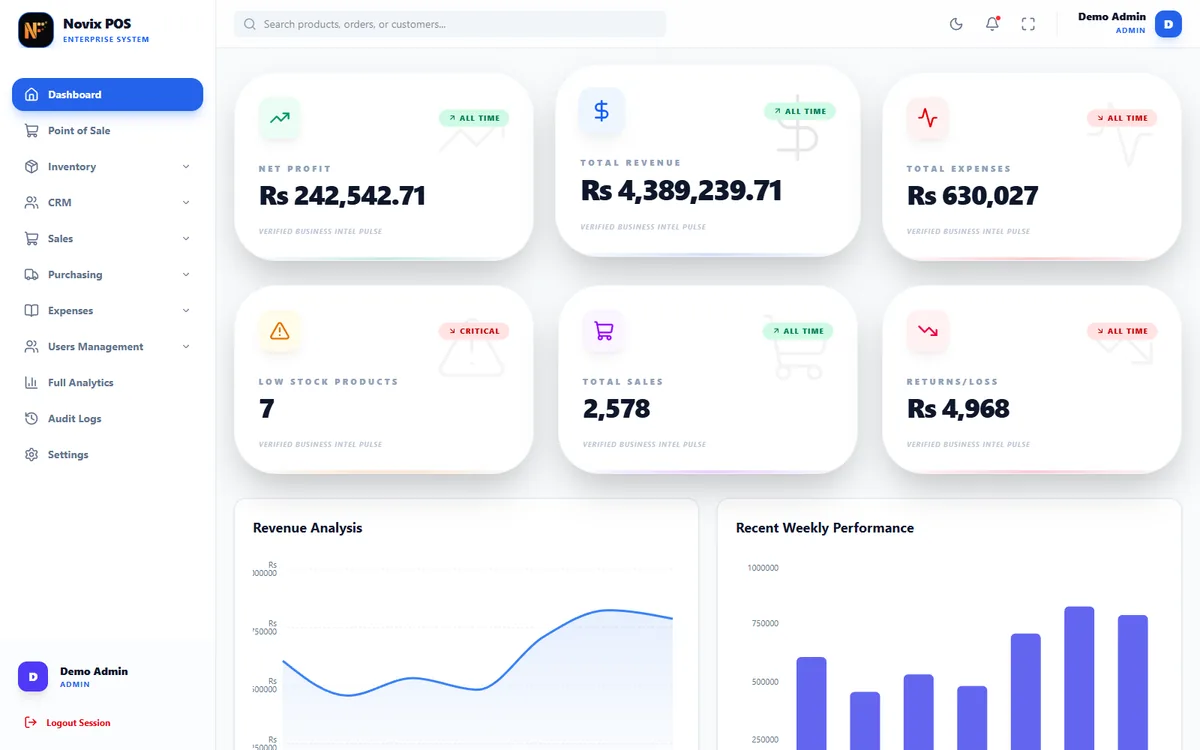
Checkout at the counter
Search by name, SKU or barcode, change quantities, hold a sale and resume it later, add a discount and take payment. Tax and totals update as you go.
- Barcode or name search
- Hold and resume sales
- F-key shortcuts
- 02
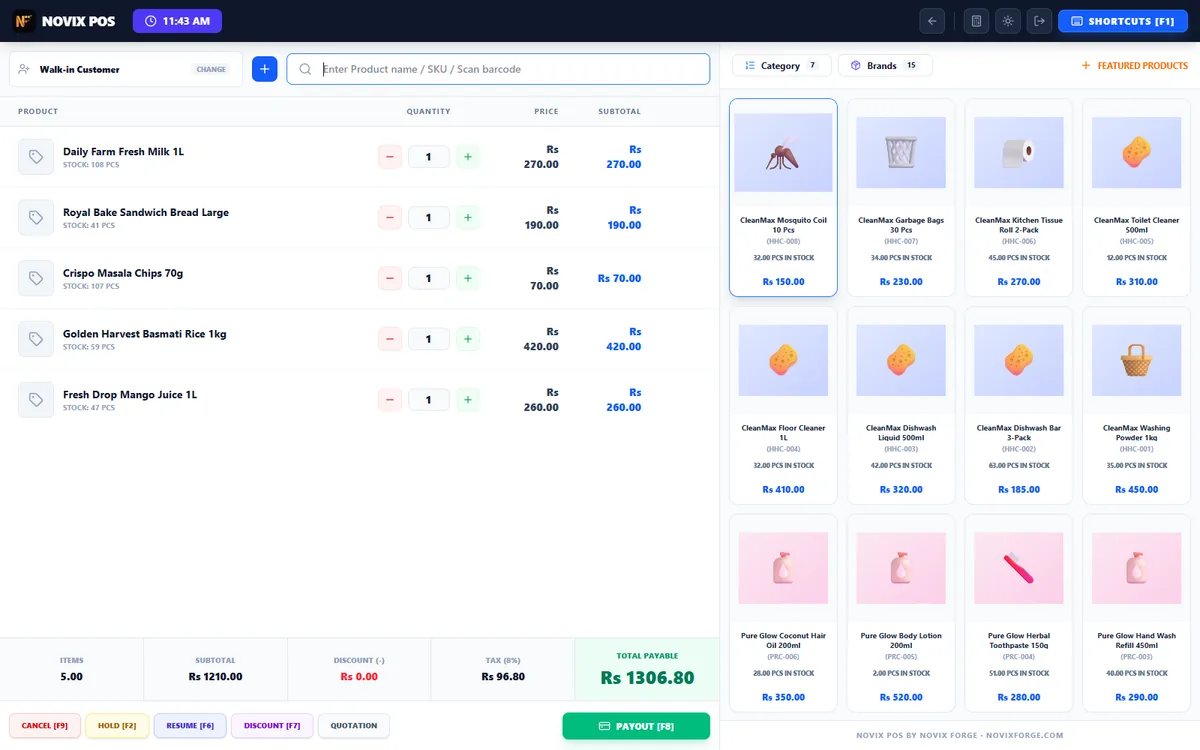
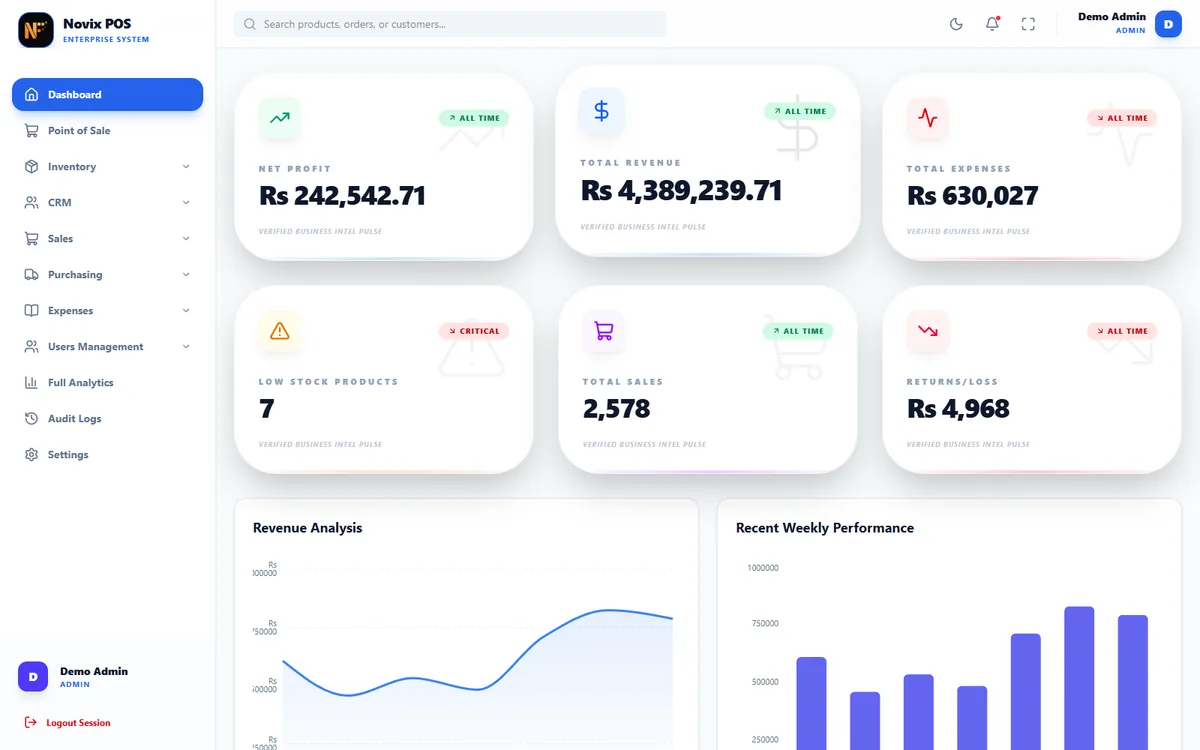
Dashboard for the owner
Revenue, expenses, net profit, low-stock alerts and the latest sales, purchases, returns and expenses on one screen, with charts.
- Profit after expenses
- Low-stock alerts
- Full analytics page
- 03
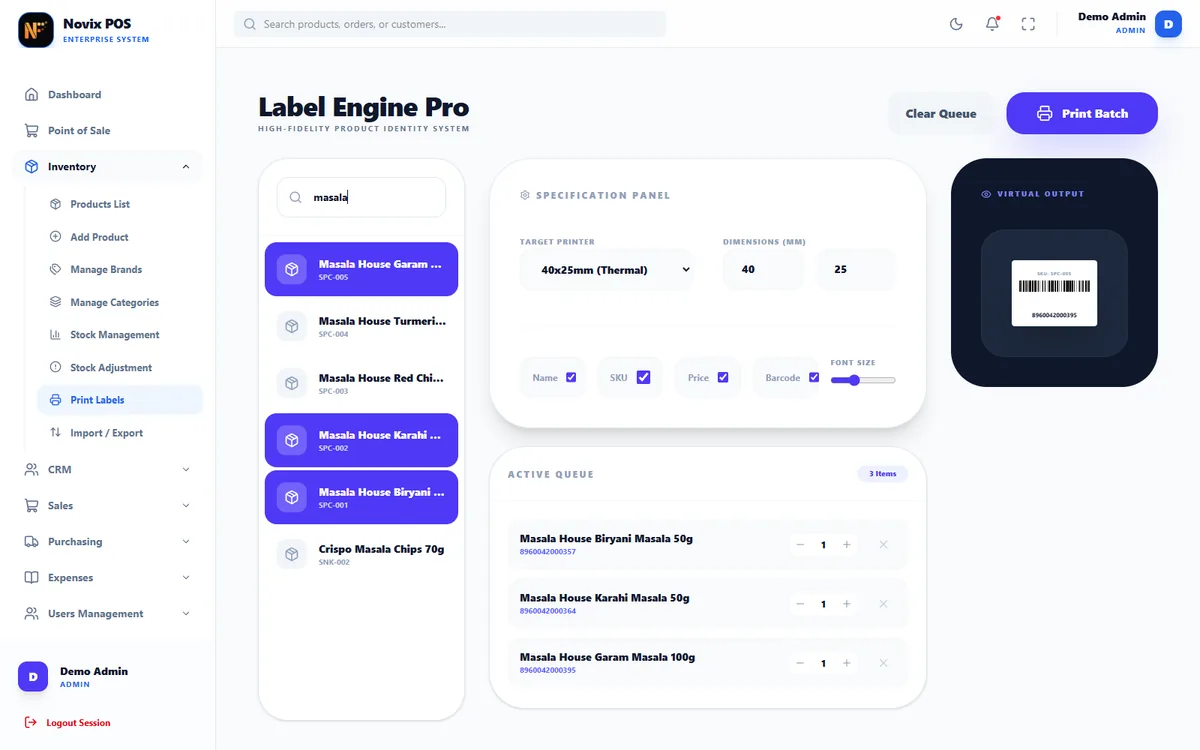
Stock and barcode labels
Products, brands and categories, stock adjustments with history, import and export, and barcode labels printed on thermal label printers.
- Stock history
- 40x25mm thermal labels
- Import and export
- 04
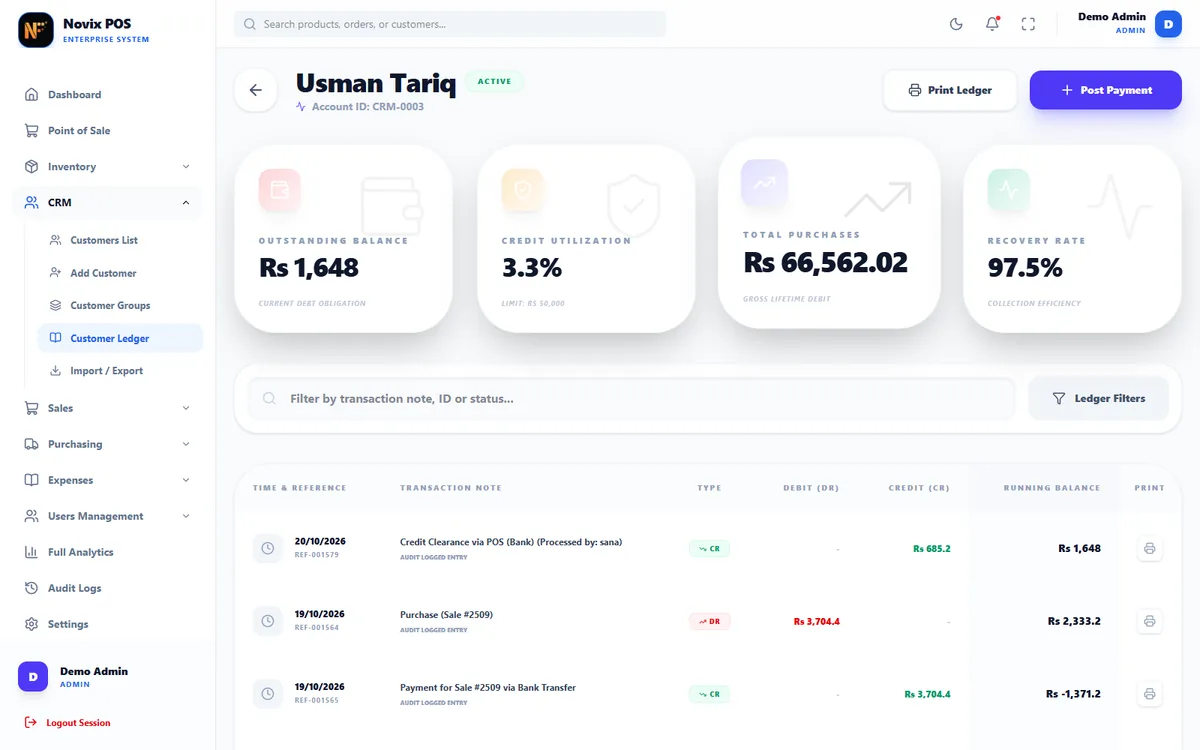
Customer credit and ledgers
Customers, groups with their own discounts, and a ledger for each customer with a running balance. Take a payment and print the ledger.
- Running balance
- Group discounts
- Printable ledger
- 05
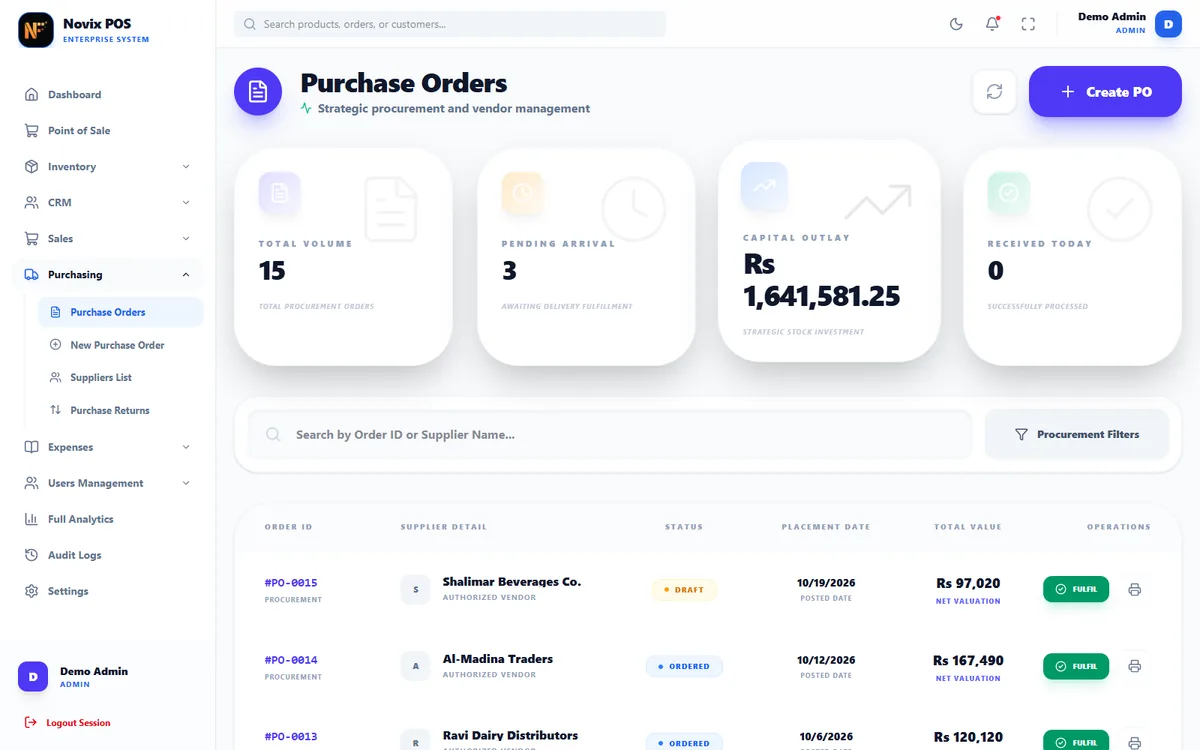
Purchasing and suppliers
Purchase orders that add stock when received, supplier accounts with their own ledger, and purchase returns.
- Receive stock from a PO
- Supplier ledger
- Purchase returns
See it working
Real clicks, real screens.
Every clip below is the real app, recorded in the live demo with sample data. Open the demo and click through the same screens yourself.
- 01
A sale, from search to receipt
Search for items, add them to the cart, change a quantity, pay in cash and get the receipt.
- Live totals with tax
- Change worked out for you
- Receipt with a barcode
- 02
Receipt design with a live preview
Switch receipt fields on or off and the preview changes as you click, before anything is printed.
- 58mm and 80mm paper
- Logo, NTN, tax and payment lines
- 03
Dashboard and analytics
Scroll through the owner's numbers, then open the full analytics page.
- Revenue, expenses and profit
- Recent activity
- 04
Barcode labels in a few clicks
Find products, add them to the print queue and see the label before it prints.
- Thermal label sizes
- Name, SKU, price and barcode
What we did
What's inside, module by module.
- 1Counter
Sales
Checkout, held sales, quotations that turn into sales, sales returns and printed receipts.
- Quotations
- Sales returns
- Receipt reprints
- 2Stock
Inventory
Products, categories and brands, stock management and adjustments with a full history, and barcode labels.
- Stock adjustments
- Low-stock levels
- Import and export
- 3Money
Accounts
Customer and supplier ledgers, payments against credit, and expenses by category.
- Customer credit
- Supplier payments
- Expense categories
- 4Control
Users and roles
Admins, managers and cashiers each see only the screens their role allows. Staff log in with a 6-digit PIN.
- Roles and permissions
- PIN login
- Audit log
- 5Safety
Data on the shop's PC
A local database on the shop's own computer, with backup and restore, so selling never waits for the internet.
- Works offline
- Backup and restore
Under the hood
Built for a real shop counter.
Works offline
A local database on the shop's PC. Selling never waits for the internet.
Keyboard first
F-key shortcuts, PIN login and barcode scanner support keep the counter fast.
Roles and audit log
Each role sees only what it needs, and important actions are logged.
Light and dark
Every screen works in light and dark mode, for bright shops and late shifts.
Gallery
Dark mode and paper.
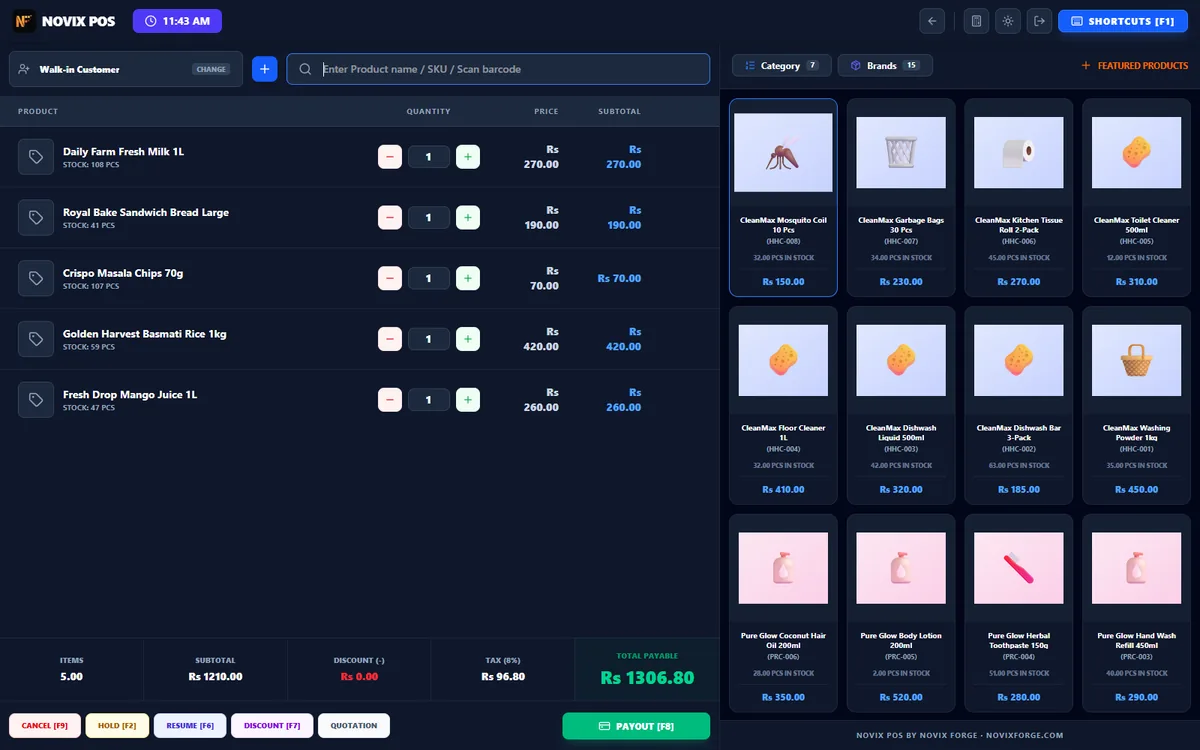
Checkout in dark mode 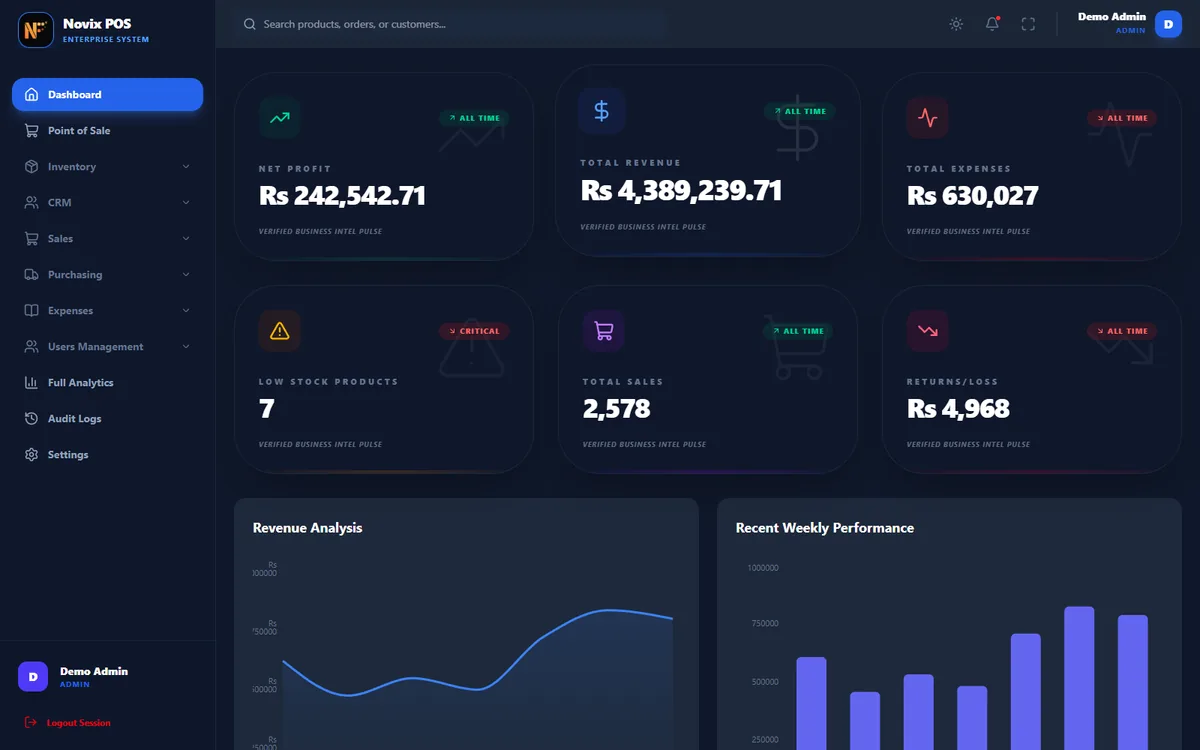
Dashboard in dark mode 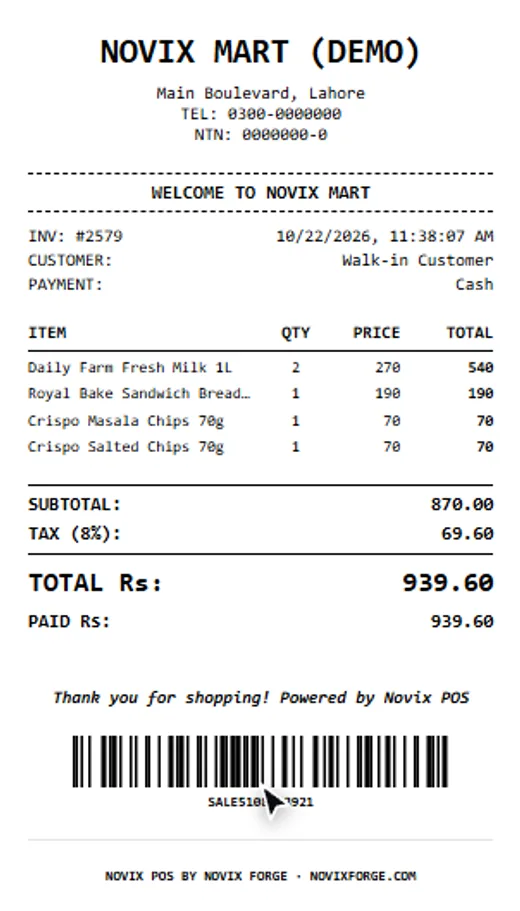
The printed receipt
Delivered
Safe data, clear roles.
How it keeps the shop's data safe
- Data stays on the shop's own PC, in a local database.
- Backup and restore are built in.
- Important actions go into an audit log.
- Cashiers only see the screens their role allows.
Tools and tech
- Electron
- React 19
- TypeScript
- Tailwind CSS
- SQLite
- Recharts
- JsBarcode
FAQ
Questions about this project.
What is Novix POS?
Novix POS is our point-of-sale and store management software for retail shops. It handles checkout and receipts, stock and barcode labels, purchasing, customer credit, expenses, users and reports in one Windows desktop app.
Does it need the internet?
No. The data is kept in a local database on the shop's own PC, so the counter keeps selling even when the internet is down. Backup and restore are built in.
Can I try it?
Yes. The live demo runs the same app in your browser with sample data from a made-up store. Nothing is sent to a server, and your changes are cleared when you close the tab or press Reset.
Does it print receipts and barcode labels?
Yes. It prints receipts on 58mm and 80mm thermal paper, with a live preview while you design them, and barcode labels on thermal label printers.
Can you build a POS or store software for my business?
Yes. We can shape Novix POS around your shop or build software around the way you already work. Book a free 30-minute call and tell us what you need.
Your site next?
Want results like Novix POS?
Tell us about your website. On a free 30-minute call we'll show you what's holding it back and what we'd fix first.