

Case study · Lahore, Pakistan
Novix Medicore: pharmacy software that knows every batch.
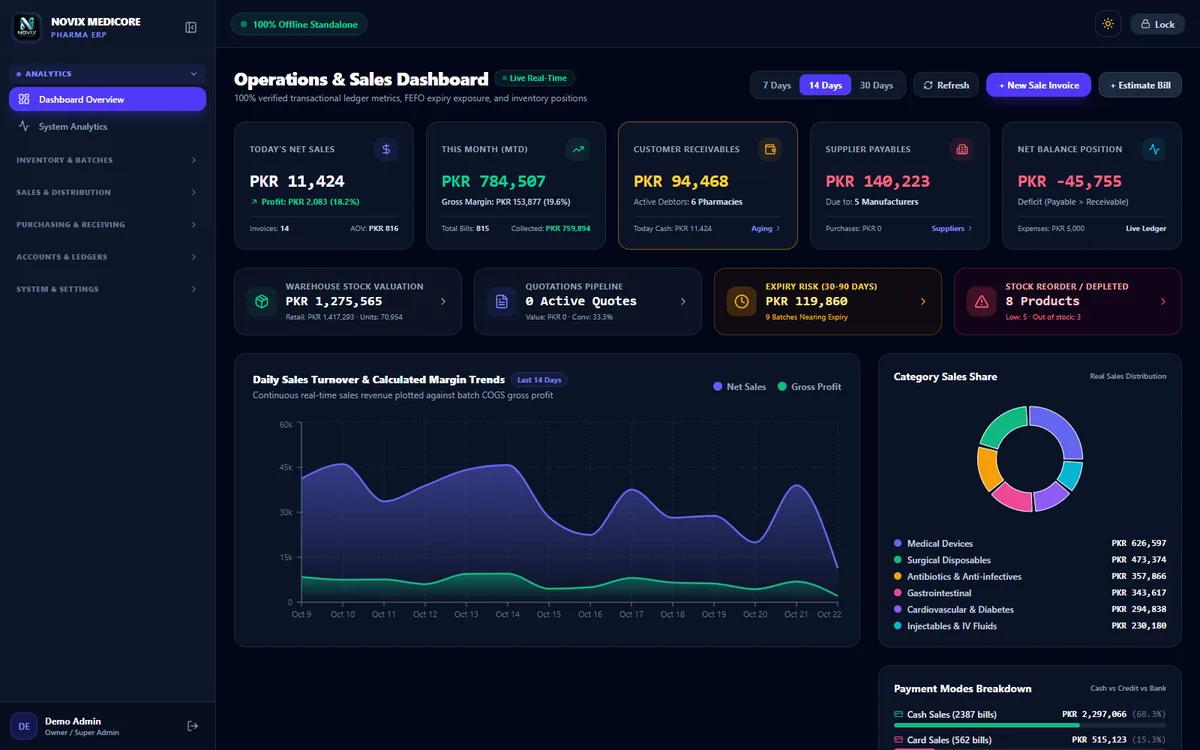
Novix Medicore is our own software for pharmacies and medicine distributors. It tracks every batch and expiry date, sells the soonest-expiring stock first (FEFO), and runs the retail counter, wholesale invoices, purchasing, ledgers and reports in one Windows desktop app that works offline.
- Product
- Novix Medicore (our own product)
- Industry
- Pharmacy & medicine distribution
- Platform
- Windows desktop app
- Location
- Lahore, Pakistan
- Status
- Live demo available
At a glance
The app, at a glance.
- FEFOfirst expiry, first outThe soonest-expiring batch is sold first, automatically
- 30+screens, from the counter to analytics
- 2ways to sellRetail counter and wholesale invoices
- Offlineworks without internetLocal database with automatic backups
The brief
Medicine expires. The software has to know when.
A pharmacy sells the same medicine from many batches, each with its own expiry date and cost. Selling the wrong batch means expired stock and lost money. The software has to handle that on every sale.
- 01Every medicine has several batches, each with an expiry date, cost and price.
- 02The batch that expires first should be sold first, without the cashier thinking about it.
- 03Near-expiry stock must be spotted early, so it can be sold or returned in time.
- 04Medicines are sold by tablet, strip and box, so packaging units have to convert correctly.
- 05Clinics and medical stores buy on credit and need ledgers and aging, plus proper invoices with a warranty.
- 06It has to keep working at the counter when the internet is down.
Screen tour
Every batch, every rupee.
- 01
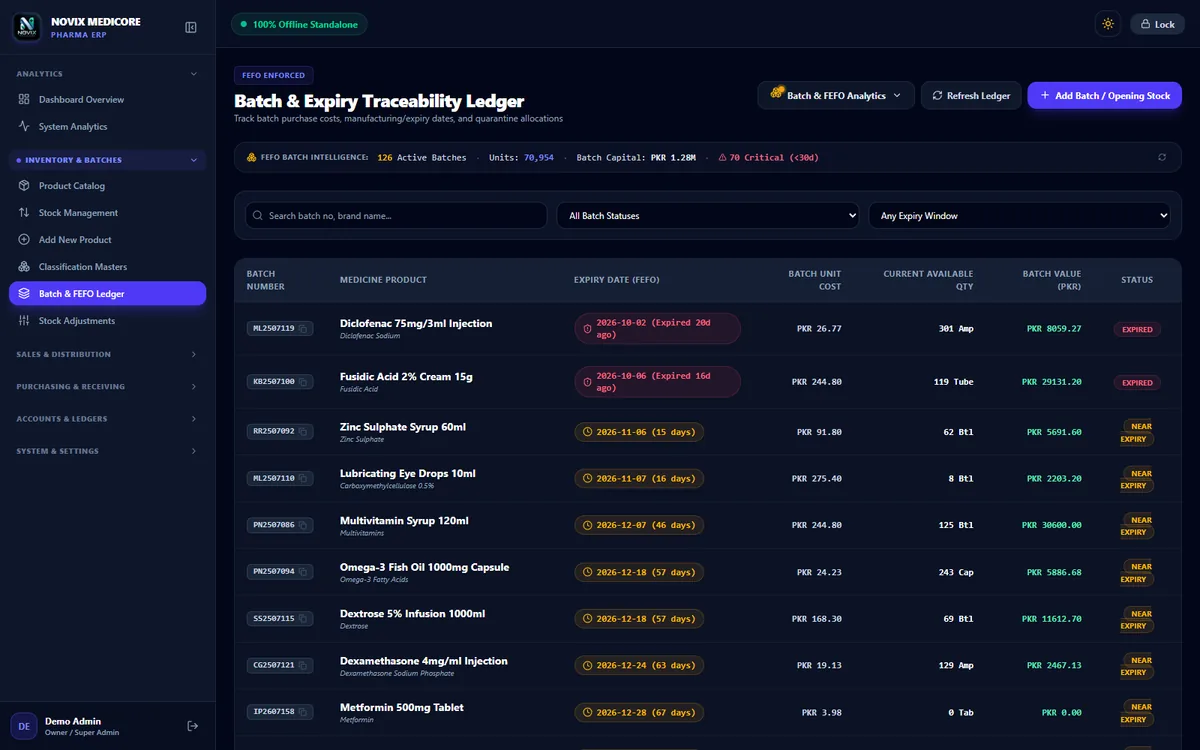
Batch and expiry ledger
Every batch with its number, expiry date, cost, quantity and value. Expired and near-expiry batches are flagged in colour, with filters by status and expiry window.
- Expired and near-expiry flags
- Batch value at cost
- Quarantine allocations
- 02
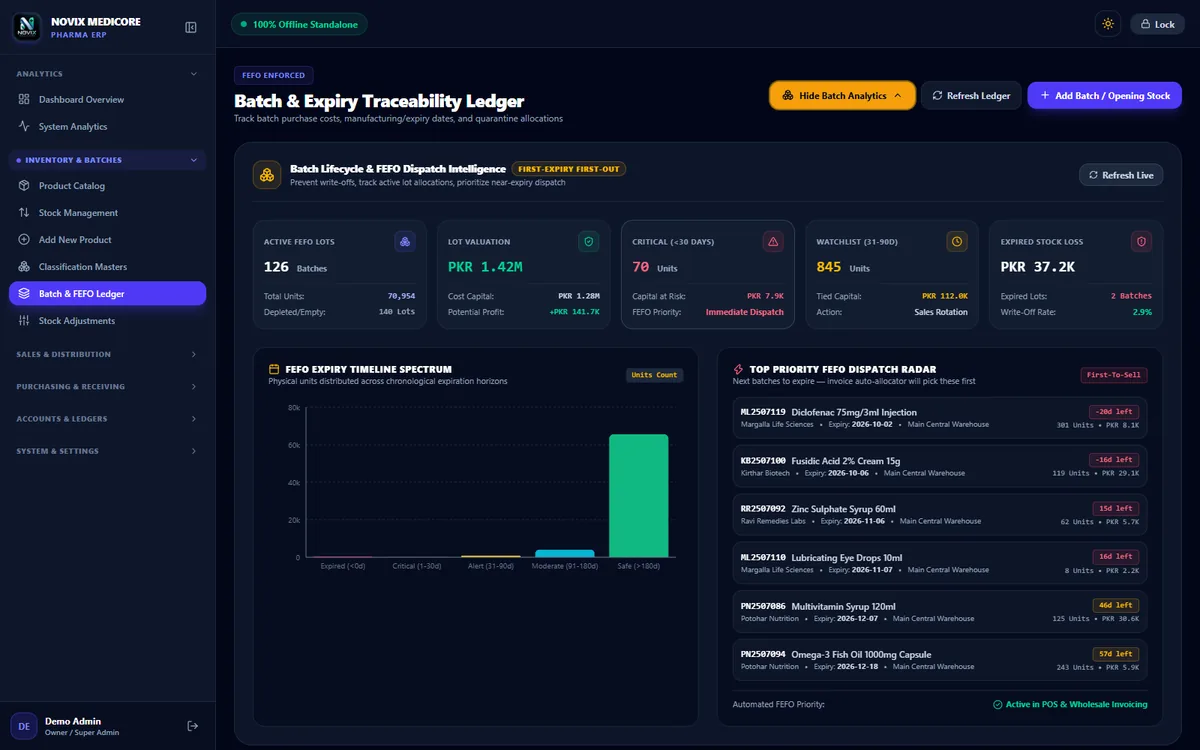
FEFO dispatch intelligence
Active lots, capital at risk under 30 days, a watchlist for 31 to 90 days, expired stock loss and a priority list of the next batches to sell.
- Expiry timeline
- Next batches to dispatch
- Expired stock loss
- 03
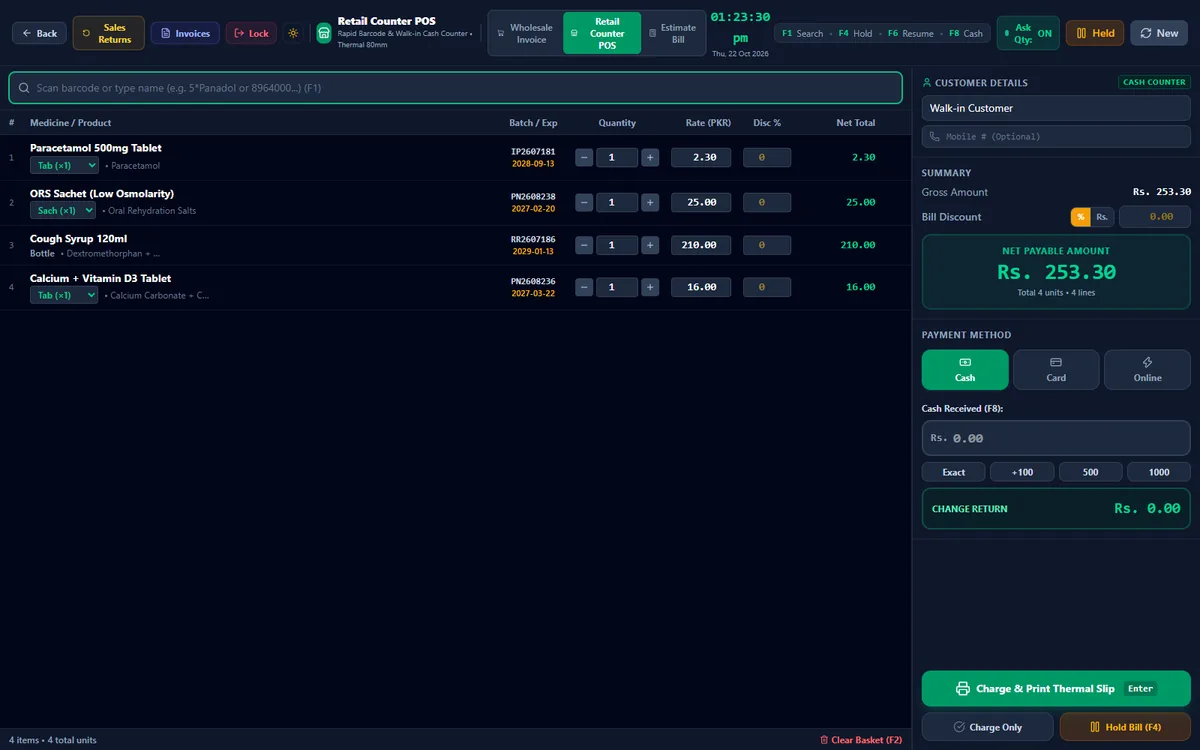
Retail counter
Search or scan a medicine, set the quantity in a pop-up and take cash, card or online payment. Each line shows the batch and expiry picked for it.
- Batch on every line
- Quick quantity entry
- Thermal receipts
- 04
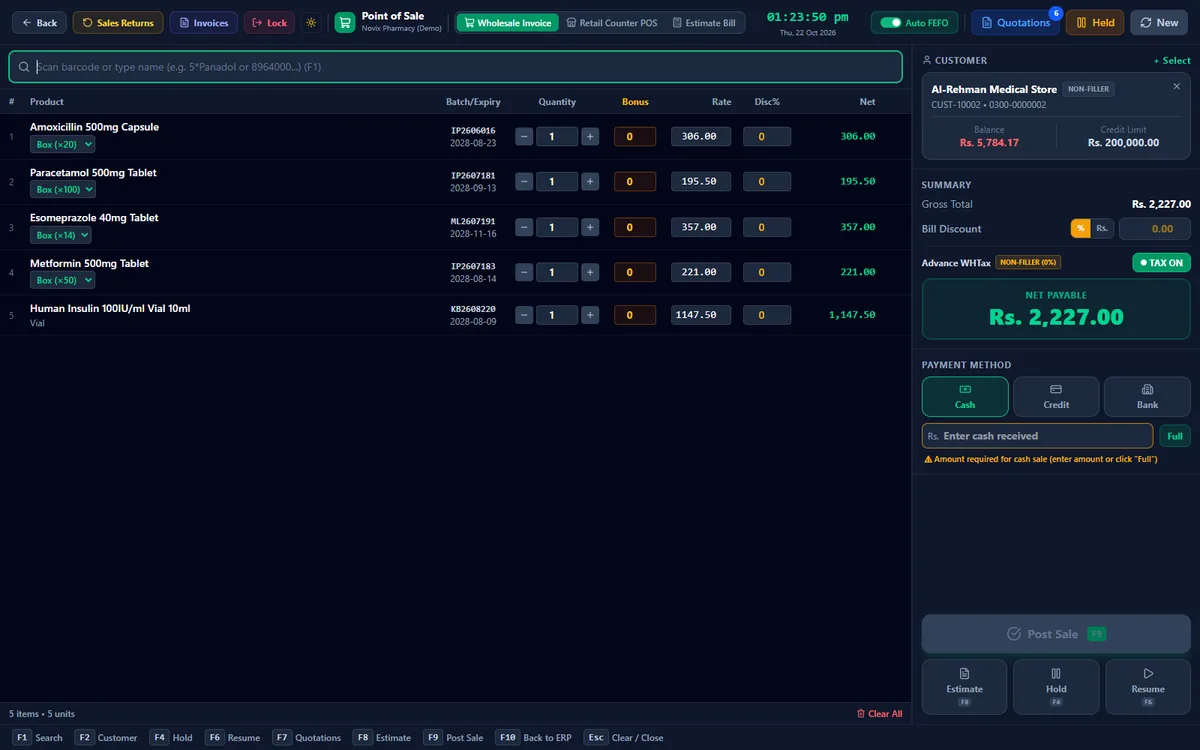
Wholesale invoices
Invoices for clinics and medical stores with packaging units (tablet, strip, box), bonus quantities, discounts, the customer's credit limit and balance, and Auto FEFO.
- Auto FEFO
- Bonus and discounts
- Credit limit check
- 05
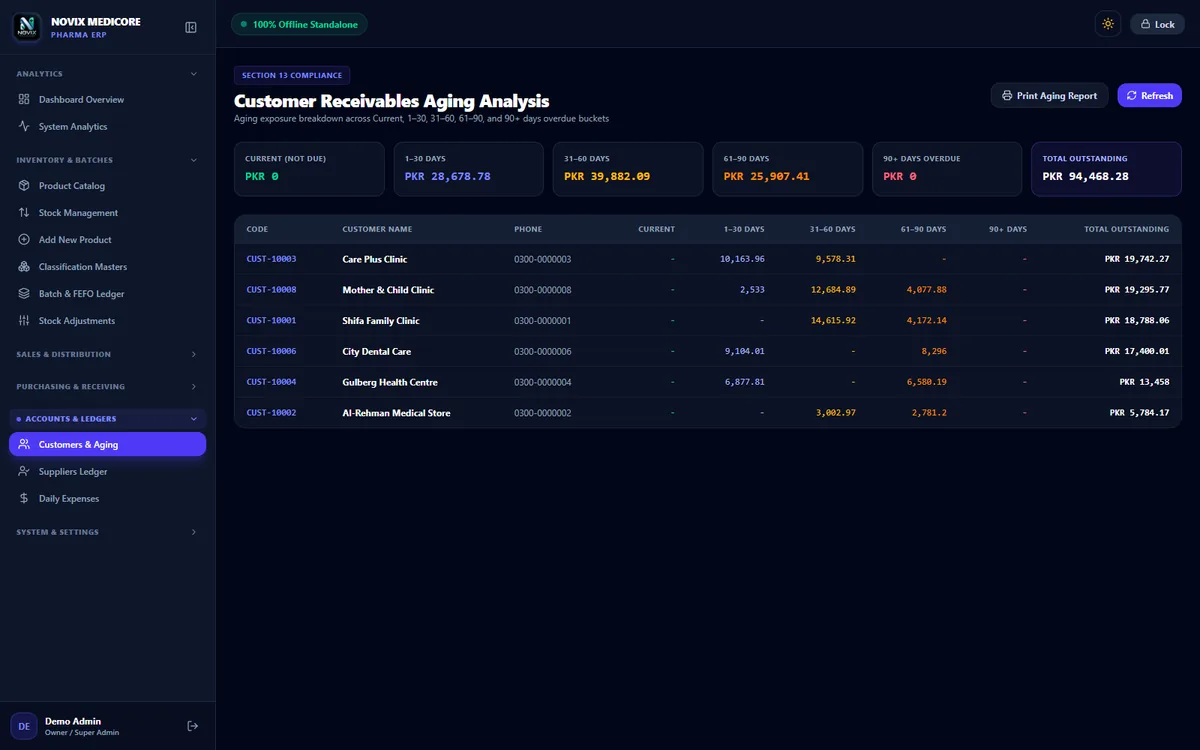
Receivables aging
What each customer owes, split into current, 1 to 30, 31 to 60, 61 to 90 and 90+ days, with a printable report.
- Aging buckets
- Customer ledgers
- Printable report
- 06
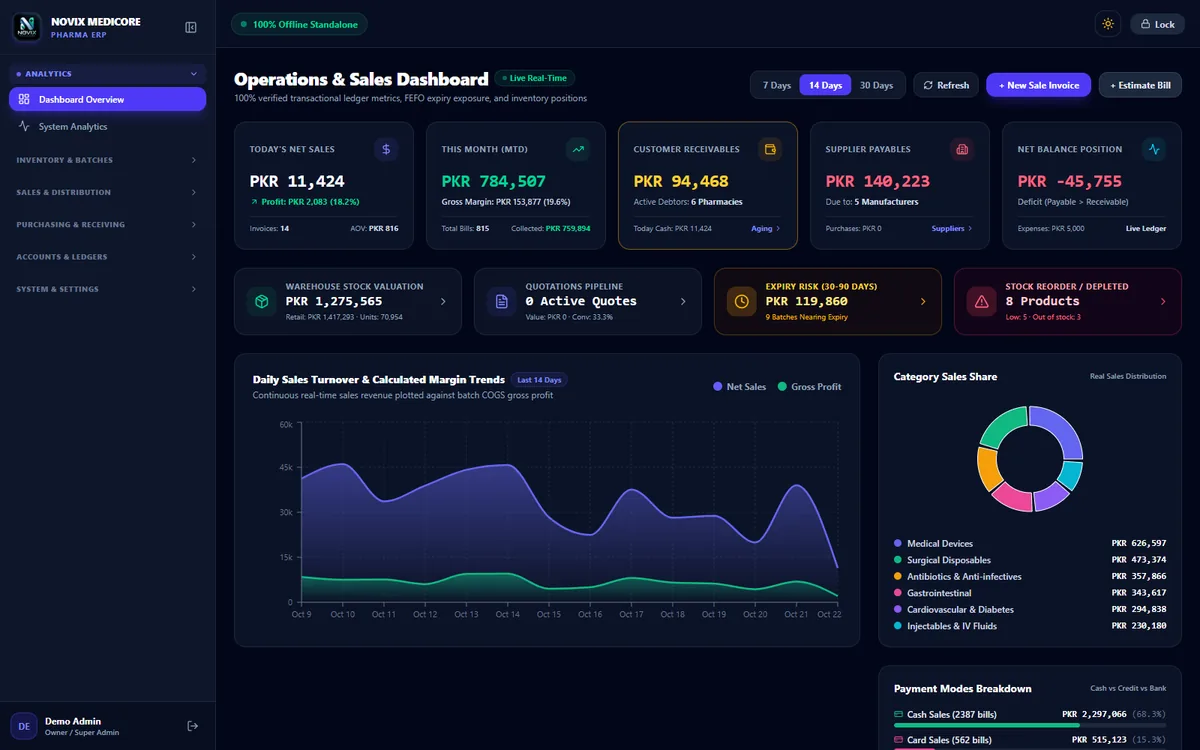
Owner dashboard
Today's sales and profit, month to date, receivables, payables, stock value, expiry risk and reorder alerts, with sales and margin charts.
- Expiry risk
- Reorder alerts
- Margin trends
See it working
Real clicks, real screens.
Every clip below is the real app, recorded in the live demo with sample data from a made-up pharmacy. Open the demo and try the same screens yourself.
- 01
A sale at the counter
Search for medicines, set quantities, take cash and finish the sale. The batch and expiry are picked for each line.
- FEFO on every line
- Change worked out for you
- 02
A wholesale invoice with Auto FEFO
Pick a medical store, add medicines, change a quantity and post the sale. The A4 invoice shows batch and expiry for every item.
- Batch and expiry on the invoice
- Drugs Act warranty
- Customer balance carried forward
- 03
Batches, expiry and FEFO analytics
Scroll the batch ledger with its expiry flags, then open the FEFO analytics and the dispatch priority list.
- Expired and near-expiry
- Capital at risk
- 04
Dashboard and system analytics
The owner's numbers, then profit and loss, sales and stock analytics for any date range.
- Profit after expenses
- Retail and wholesale views
What we did
What's inside, module by module.
- 1Sales
Counter, wholesale and estimates
Retail counter, wholesale invoices, estimates and quotations that turn into sales, held bills, and customer returns.
- Quotations
- Held bills
- Customer returns
- 2Stock
Medicines and batches
Medicines with generic names, dosage forms, manufacturers, packaging units, departments and warehouses. Batches with expiry, stock adjustments and quarantine.
- Multi-unit packaging
- Batch ledger
- Stock adjustments
- 3Buying
Purchases and suppliers
Purchases that create batches when stock is received, purchase returns and supplier ledgers.
- Receive into batches
- Purchase returns
- Supplier ledger
- 4Money
Ledgers and expenses
Customer ledgers, payments and receivables aging, supplier payables and daily expenses.
- Receivables aging
- Payments
- Expenses
- 5Paper
Invoices and receipts
A4 pharmaceutical invoices with batch and expiry and a Drugs Act warranty, thermal receipts, and an invoice designer to set it all up.
- Invoice designer
- Thermal receipts
- Printed reports
- 6Control
Users, roles and backups
Roles for owner, pharmacist, cashier, manager and accounts, PIN login, an audit log, and automatic backups to a folder of your choice.
- Roles and PIN login
- Audit log
- Automatic backups
Under the hood
Built for a real pharmacy counter.
FEFO built in
Sales pick the batch that expires first, and split across batches when one runs out.
Works offline
A local database on the pharmacy's PC, with automatic backups. Selling never waits for the internet.
Keyboard first
F-key shortcuts, barcode search and quick quantity entry keep the counter fast.
Light and dark
Every screen works in light and dark mode.
Gallery
Light mode and paper.
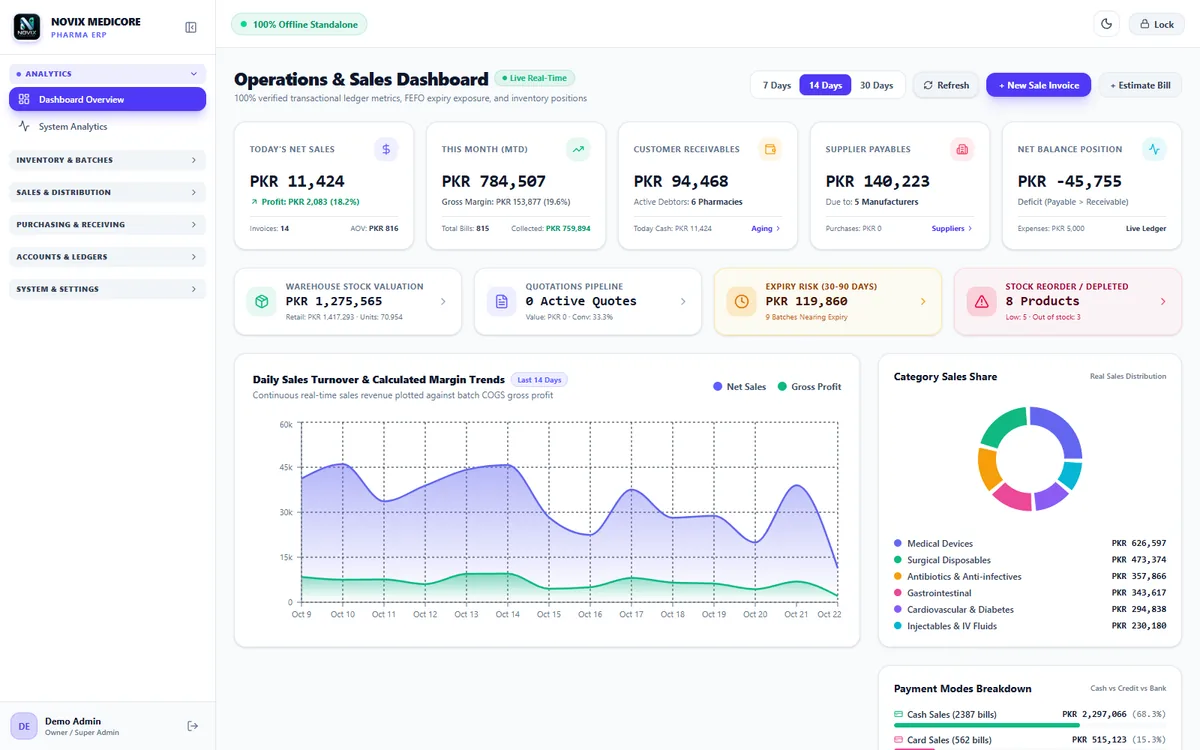
Dashboard in light mode 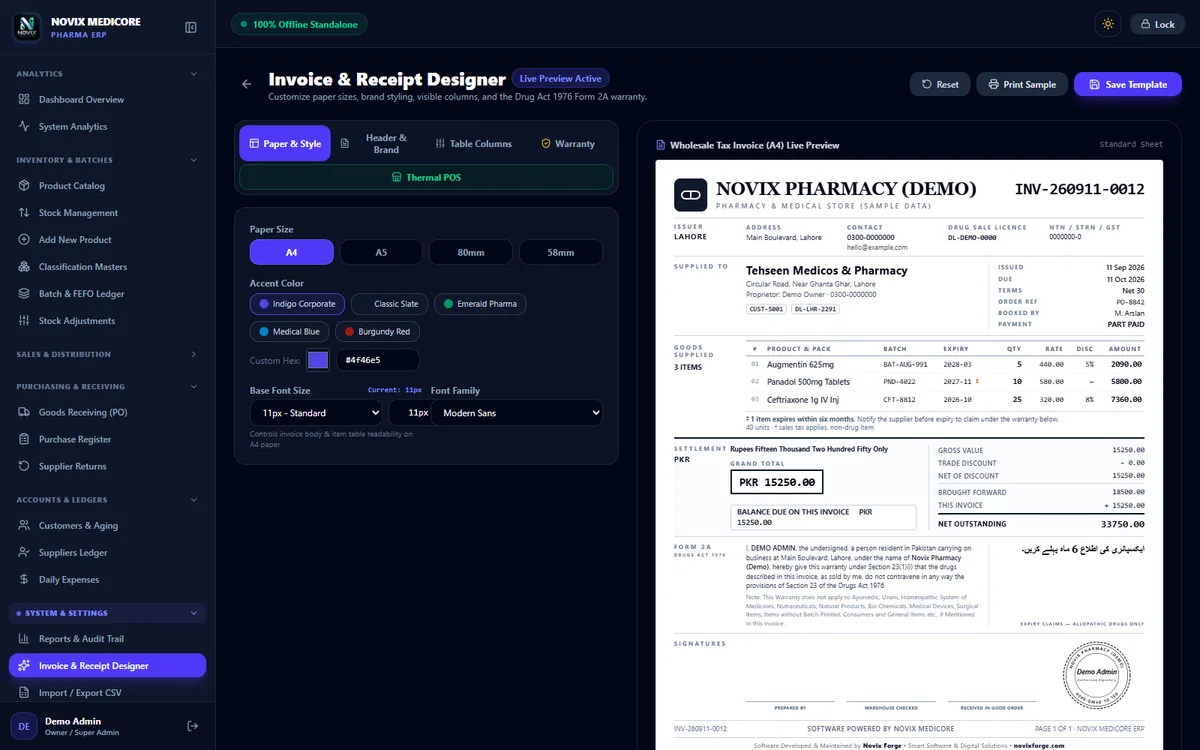
Invoice designer 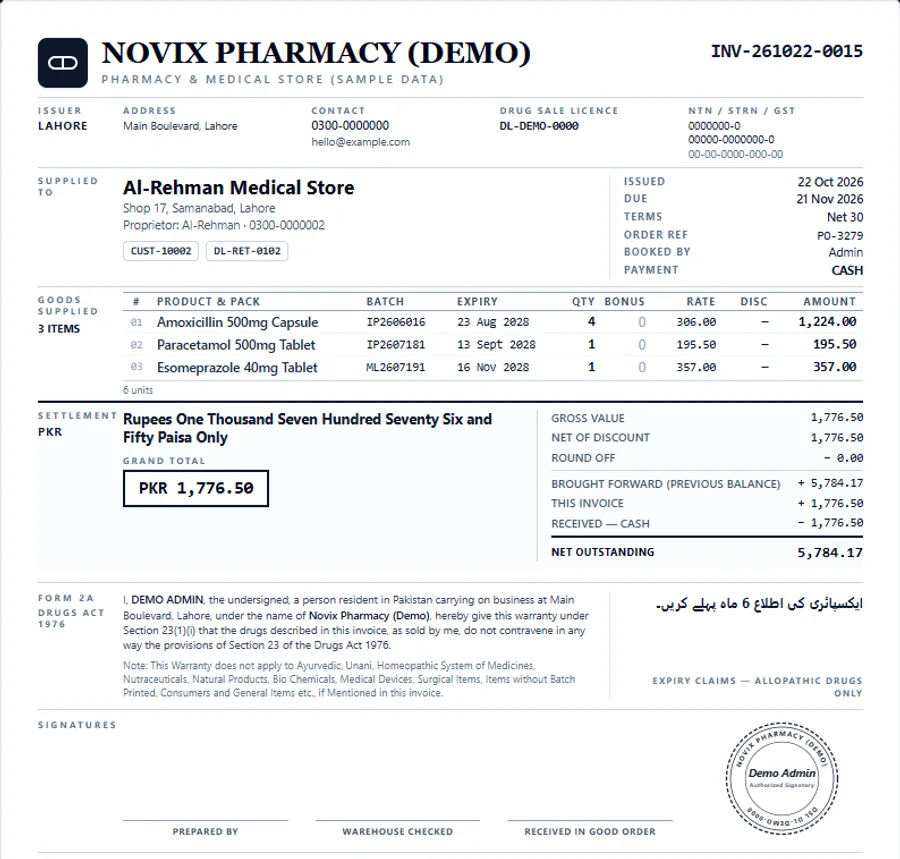
A4 invoice with batch and expiry
Delivered
Safe data, clear roles.
How it keeps the pharmacy's data safe
- Data stays on the pharmacy's own PC, in a local database.
- Automatic backups, plus backup and restore by hand.
- Important actions go into an audit log.
- Each role only sees the screens it needs.
Tools and tech
- Electron
- React 19
- TypeScript
- Tailwind CSS
- SQLite
- Recharts
- JsBarcode
FAQ
Questions about this project.
What is Novix Medicore?
Novix Medicore is our software for pharmacies and medicine distributors. It tracks batches and expiry dates, sells stock first-expiry-first-out (FEFO), and runs the retail counter, wholesale invoices, purchasing, ledgers and reports in one Windows desktop app.
What does FEFO mean?
First expiry, first out. When you sell a medicine, the software takes it from the batch that expires soonest. If that batch runs out, it moves on to the next one. This keeps expired stock, and the money lost on it, as low as possible.
Does it work for wholesale and retail?
Yes. It has a fast retail counter for walk-in customers and wholesale invoices for clinics and medical stores, with packaging units, bonus quantities, credit limits and printed A4 invoices.
Does it need the internet?
No. The data is kept in a local database on your own PC, with automatic backups, so the counter keeps working without internet.
Can I try it?
Yes. The live demo runs the same app in your browser with sample data from a made-up pharmacy. Nothing is sent to a server, and your changes are cleared when you close the tab or press Reset.
Can you set it up for my pharmacy?
Yes. We can set up Novix Medicore for your pharmacy or shape it around the way you work. Book a free 30-minute call and tell us what you need.
Your site next?
Want results like Novix Medicore?
Tell us about your website. On a free 30-minute call we'll show you what's holding it back and what we'd fix first.